Stock Market AppStock Market AppWhat Live Data Shows
How Analytics and Charts Can Help
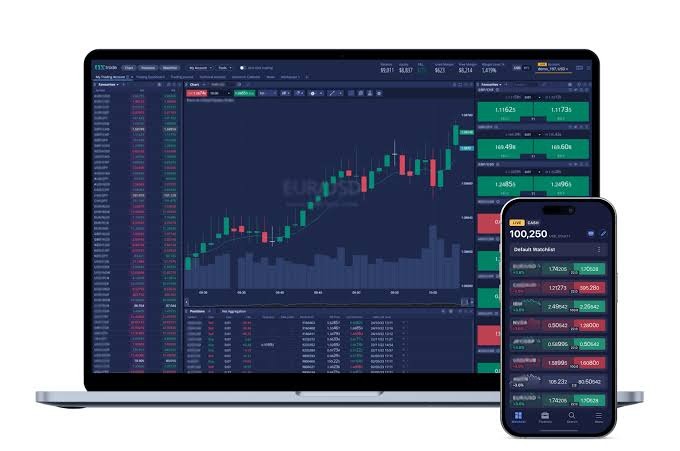
Charts show price moves over a selected time period. A daily chart shows you trends over months. The chart is divided into shorter blocks if the breaks are five minutes.
Volume bars give you an idea of trading activity. Tools like moving averages smooth out past price data to show trends. Based on past or present inputs, they cannot guarantee a gain.
For example, an increase in price with an increase in volume shows that trading activity increased during the price increase. That doesn’t mean the stock will keep climbing. News and business results need context as well.
Steps to Start Using an App
1. Check the broker
Check broker’s SEBI registration and exchange membership from official records. Match the name on those records to the company that runs the app. A broker is not verified by an app store rating.
2. Set up the account
Finish your broker’s identity checks and connect your bank account. A demat account is an electronic record of your shares. You use a trading account to place buy and sell orders. Your account might take some time to be approved.
3. Build a watchlist
Add stocks to a list to track their prices. Check the symbol and the exchange, so you don’t confuse similar names. Open each quote page to see what data fields the app provides.
Please review the trade side, share quantity, order type and product prior to submitting an order. A market order intends to be executed at available prices. A limit order limits the price, but may not be filled.
5. Check the order status
Not every order placed is a trade made. It can be open, partially filled, filled or rejected. Check its status and try again. This avoids double orders when the screen takes a while to refresh.
Track Holdings and Expenses
The holdings page can display the number of shares you own, their cost and their current value. Open profit or loss varies with prices. These are not gains or losses that are “realized” when selling shares.
Let’s say you bought ten shares at ₹100 each. That’s ₹1,000 before fees. At Rs 105 a share, they are worth Rs 1,050 each. The ₹50 gap is an unrealised gain as long as those shares are held.
Review the broker’s fee schedule. Broking, taxes, exchange and demat charges may be applicable on the trade or service. Free download does not mean all account services and trades are free.
Check Access and Support
Utilise the official download link and the login checks provided by the broker. Keep your passwords and one-time codes secret. Kindly check the trade alerts and report any trades you do not recognise through the official support channels.
Also, an app depends on your network and its systems. Weak signals or outages can delay updates. See if the broker has a different way of handling orders during an outage and how to reach support.
Price alerts may help to track a particular level. But an alert is an alert, not confirmation of an order being placed or filled. See terms for any feature that connects alerts to trades.
Conclusion
Live trading and analytics combine market data with account tools in one place. What you get is easy access to prices, orders, charts and records. Using the service means knowing each feature, checking costs and order status. No app can remove market risk or guarantee returns.
Sources
A mutual fund app can put fund research, payments and record all on one screen. People looking for The Best Mutual Fund App are scrutinised for safety, fees and ease-of-use. You can manage a wealth plan with an app. It cannot eliminate market risk or guarantee the growth of wealth.
Knowing what you’re working toward makes every payment feel purposeful. In a SIP Investment, the investor invests a fixed amount in a fund at regular intervals. This will help to establish a steady routine and you won’t have to place each order manually. Regular payments do not promise a gain as the value of the fund can still go up or down.
What Does an App Do?
Mutual funds are pools of investments that are invested in assets such as shares or debt. The funds can be accessed via an app. It could enable people to view schemes, place orders, set up SIPs and track their holdings.
The fund and the app are used for different purposes. The app handles requests and access. The fund house runs the scheme. A quick sign-in or a slick screen doesn’t tell you much about how a fund will perform.
Step 1: Check Who Runs the Service
Look up the legal name of the company that created the app. Check its role and what registration applies to that role. For example, a fund distributor has to have an AMFI Registration Number. The home page claim must match an official record.
Read the help and contact pages too.” Identify an easy way to raise an issue and track its progress. App ratings can explain the service, but they don’t prove the legal status or quality of the funds.
Step 2: Review Access & Privacy Settings
The safety of your account starts with where you get the download. Check the name of the app publisher by clicking on the link on the provider’s official site. Look for secure sign-in, alerts and a way to block access if a phone is lost.
Keep passwords and one-time codes secret. Never share a screen with an unknown caller offering help. Check out what data the app is looking for and why it needs it. For example, access to a contact list needs a clear reason.
Step 3: Read fund details and expenses
A fund page should state the scheme name, plan type, risk level, and fees. The Riskometer indicates the risk level of a scheme. It’s a guide to risk, not a promise of safety.
Direct and regular plans have different cost structure. Regular plans include the cost of distribution. Look at the fund’s expense ratio, which is the cost of the fund, and any exit load that may be applicable when units are sold. Also see if the app charges any extra service fee.
Tax rules can also impact the net proceeds.
Context is needed for past gains. A fund’s risk profile isn’t fully revealed by a single year on its chart. What the scheme contains and what it seeks to do Read
Step 4: Finish the Account Checks
The setup flow depends on the provider and KYC status. KYC means Know Your Customer and is used to verify the identity of an investor. The app may ask for PAN, bank details, identity or address proof.
Please make sure you fill in all required fields and check your entries before you submit. Applications, terms of consent. Nominate through the right channels. Photocopy important documents. Do not order until you have confirmation that all checks are complete.
Step 5: Setup and Track SIP
Account checks. Select scheme and plan. Enter the amount and choose the available date. Confirm the payment mandate, if needed. Kindly confirm the start date and keep the funds at the bank account link.
For example, if you invest ₹1,000 every month for 12 months, then you are investing ₹12,000 in total. The value of the units at the end of the year may be greater or less than this sum. This is cash, not a projection of earnings.
See the rules on pause, change or cancellation. If you stop future SIP payments, you cannot sell the units that you already hold.
Keep Your Goals and Records in Sight
A clear dashboard should separate value today from money paid in. Review failed payments and match the app records with statements received from fund house or registrar. — Please report bugs using the official support channel.
Take a SIP calculator as an estimate. According to the rate and time entered, actual returns may vary. Revisit goal as needs change and check progress at planned intervals. Constant screen checks are no test of sound planning.
Conclusion
A mutual fund app can help your wealth goals with clear records and easy access. Check its provider, security, fees, fund details and service process. Accessing your account securely helps to keep it safe. Funds held, costs, market moves and time still drive wealth outcomes.
Sources